
Faster at the slide. Worse at the source.

You sent the briefing ten minutes before the meeting. Clean headings, and a number on slide two that makes the argument land. You’re proud of how it all looks.
Until someone asks where that number came from.
You remember asking the AI model. You do not remember opening the file and looking into the details.
Not the look you’re going for.
In 2023 a lawyer filed a brief with citations a chatbot had invented. The work looked finished. It looked credible. But the sources were not real.
While you might not be in that courtroom, you are still sending work with your name on it. So you need to be ready to own it.
A 2026 field experiment tried to quantify how serious this problem might be.
Researchers ran a lab-in-the-field test with 128 knowledge workers at one European industrial firm. The tool was an internal app sitting on top of company files. The employees were split into groups, and both groups could search the same files. One group also had the model in a second tab. They were instructed to complete three tasks: extract two specified facts from internal documents, condense a product description, and invent ideas for future products. Bottesch, Schwenke, Zimmermann, Förster, and Klier, arXiv:2607.25922.
Authors report that people with the model finished the fact-finding task 29% faster, the summary 52% faster, and the ideas 39% faster.
But something strange happened.
They got worse at the fact-finding task.
People who searched the files without the model were more accurate than those who used it. Meanwhile, the model improved the quality of the summaries and product ideas.
So AI helped people move faster across all three kinds of work. But the quality gains depended on what kind of work they were doing.
The limits matter. This was one firm using one internal AI tool on a narrow set of tasks. “Acquisition” meant extracting two known facts from internal files. It does not prove that AI makes you worse at figuring out what is true about the world.
But it shows something worth paying attention to: when the job was to pull facts from a source, the people using AI were faster and less accurate.
The study doesn’t tell us exactly why.
But I suspect part of the answer has less to do with the technology than with how we’ve designed knowledge work.
The study stopped at three kinds of work: find the fact, wrap it, invent something. That is missing the step that actually protects you. After you find a fact, and before it goes into the slide, you check it against the source. I call that step “verify”.
Looking finished doesn’t mean finished
Most of your week is probably some mix of finding information, making sense of it, packaging it for someone else, and deciding what should happen next.
A request comes in from your boss. You find the relevant information, add some nuance, put it into a slide, and add a recommendation so the room has something to decide.
But the person who asked for the briefing doesn’t watch you do the work. They don’t see which documents you opened, what you checked, or how long you spent deciding whether a number was trustworthy.
They see the finished product.
The deck lands on time, with clean grammar. The number sounds plausible, and the recommendation looks considered.
That creates a dangerous incentive: the visible parts of the work get rewarded, while the invisible work of checking whether something is actually true can feel like a delay.
AI makes this tension worse because it can give unfinished research the appearance of finished work.
Once the model has produced a polished sentence, checking the underlying file feels like going backwards. You already have something that looks complete. The meeting is in ten minutes. The number is sitting there with the kind of confidence that makes it look well-researched.
So your default is to spend your time focused on the part of the work the room can see, and to skip the part the room cannot. The risk is that you get faster at the packaging while spending less time understanding the details it depends on.
The danger is shipping work you did not check and cannot own.
I previously wrote about using AI like everyone will know. Own the output. This letter is about making that step concrete, by understanding the big picture of how you tackle your work.
Where AI fits in your workflow
Most knowledge work is a sequence of steps:
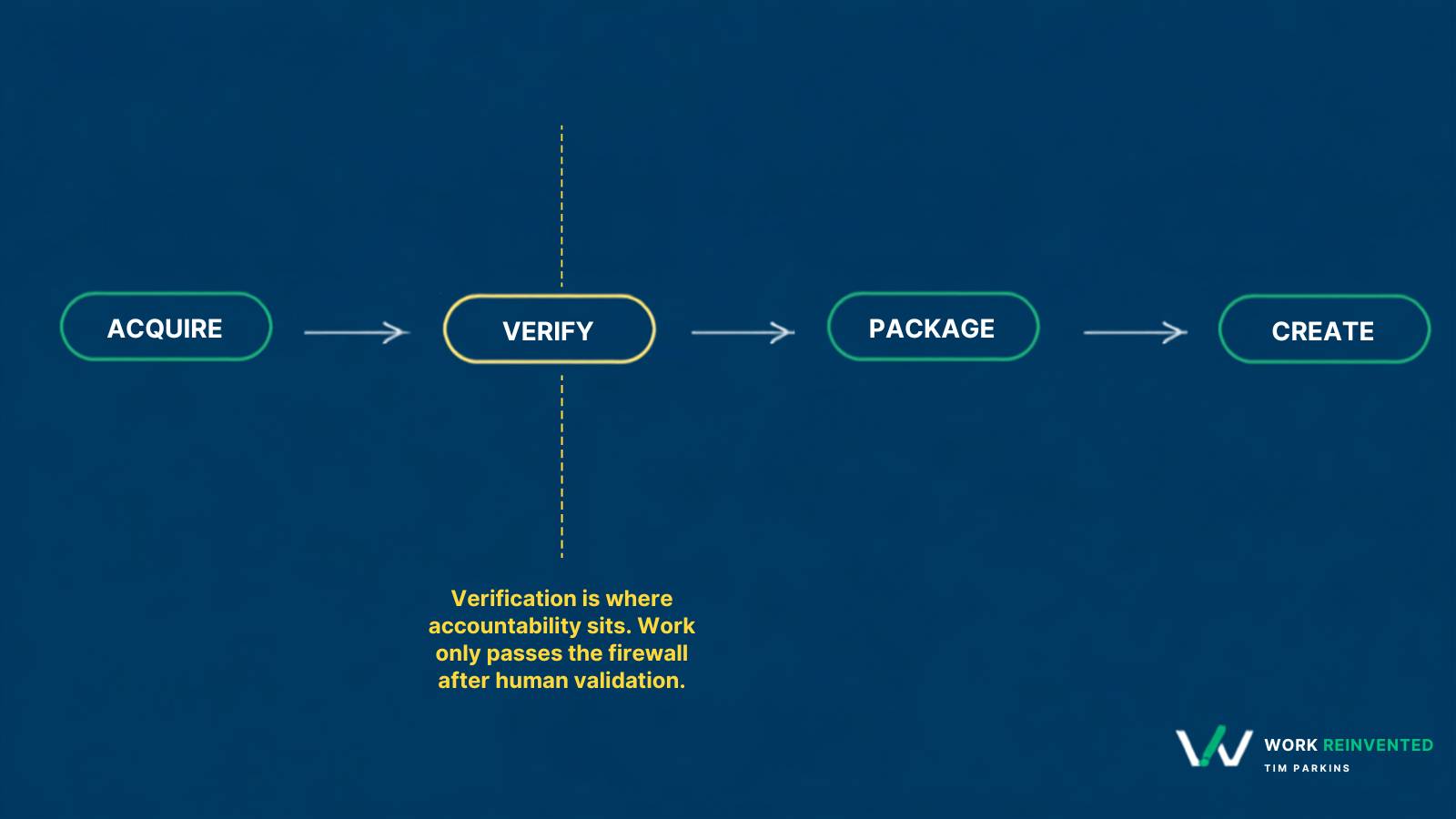
Each stage requires a different kind of judgment, and AI should not be trusted equally in each one.
Acquire: What information do I need?
Acquire is finding information that already exists somewhere.
A specification. A date. A financial number. What the memo says. Who approved something. What happened in the last meeting.
AI can be extremely useful here. It can search, retrieve, summarize and help you navigate far more information than you could reasonably work through yourself.
But finding an answer is not the same thing as establishing that the answer is correct.
That is why verify sits next. The model can fetch. It does not get to stamp the fact as true.
Verify: Is this actually true?
Before an acquired fact becomes part of your argument, check it against the source.
Open the file. Look at the data. Read the paragraph. Confirm the date. Make sure the citation actually says what the model claims it says.
The more consequential the fact, the higher the verification bar should be.
AI can help you find the evidence. It doesn’t get to certify it.
Package: How do I make this understandable?
Once the facts are solid, AI can be extremely useful in helping you organize and communicate them.
Summaries. Briefing notes. Slides. Emails. Reports. Explanations.
This is where AI often shines because the raw material already exists. You are asking it to help shape information rather than establish whether the underlying information is true.
Create: What could or should happen next?
Create is where you move from information into possibility.
- What options do we have?
- What should we recommend?
- What are we missing?
- What might happen if we choose A instead of B?
AI can be a terrific thinking partner here because generating possibilities differs from asserting facts.
You still need judgment.
But you are judging ideas, not pretending generated ideas are evidence.
The mistake is treating all four activities as though they require the same level of trust.
They don’t.
What to do
Look at the work you have coming up this week.
Instead of wondering, “Should I use AI for this?” ask yourself, “Which part of the work am I asking AI to do?”
Am I asking it to:
- Acquire information?
- Verify information I plan to rely on, while checking the underlying source myself?
- Package information I already trust?
- Create possibilities, recommendations, or ideas?
You do not need to avoid AI when acquiring information. I certainly don’t.
Just don’t allow acquisition to silently become verification.
Before a fact moves into your slide, briefing, report or recommendation, make sure you can point to the source and defend what it says.
Then use the model aggressively where it helps: make sense of the information, organize it, challenge your thinking, improve the explanation, develop options.
But keep one boundary intact:
Acquire → Verify → Package → Create
AI can help at every stage.
Your level of trust should not be the same at every stage.
If you cannot point to the evidence behind the number, it does not go onto slide 2.